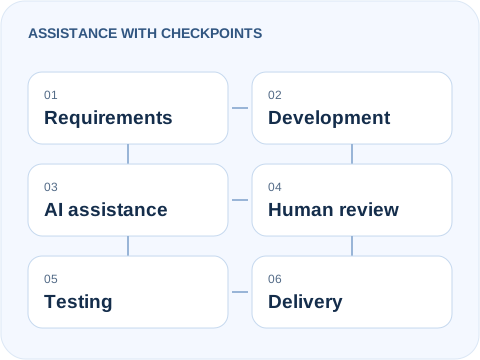
AI can help explore a codebase, investigate a bug or draft a change. Engineering judgment decides what belongs in the final website.
Codex-assisted implementation and test work is part of this website's development. The wider tool descriptions below are a guide to possible roles, not a claim that I personally use every product.
Suggestions pass through human review and testing before delivery.
EVIDENCE AND TOOL ROLES
Coding assistance is one part of the toolkit
Used in this website's development
OpenAI Codex
Codex helps explore existing code, propose focused implementation changes, investigate failures, draft tests and assist with refactoring. It works best with a clear task, project context and checks against the intended behavior.
For this website, that assistance is paired with source review, PHP validation and browser tests. A completed suggestion is not evidence that the result is secure, accessible or ready to deploy.
Personal use or evaluation of these products has not been established here. Their inclusion explains the ecosystem without endorsements or affiliation claims.
Claude
Claude can support code analysis, architecture discussions, debugging, documentation and comparison of implementation approaches. Claude Code offers codebase-oriented workflows. Recommendations still need checking against the actual project.
A conversational assistant can help organize a plan, explain implementation choices, investigate technical questions and draft documentation. Research claims should be verified against current primary sources, especially when product behavior changes.
Copilot provides coding assistance in development workflows, including suggestions and help understanding code. It is an ecosystem option here; active personal use is not claimed.
Gemini-based assistance is relevant to technical exploration, code explanation and debugging. Product editions and availability change, so check current provider documentation rather than assume a particular feature or plan is available.
Cursor is an AI-oriented coding environment. Windsurf is another name encountered in this ecosystem; its Cascade documentation currently redirects to Devin Desktop documentation. Neither is presented here as a verified personal tool. See Cursor's documentation and the current Cascade documentation for product details.
VS Code is an editor; Git tracks changes and GitHub supports collaboration. Docker packages application environments, Postman supports API work, Chrome DevTools supports browser diagnosis, and Lighthouse and Playwright support different forms of verification. These tools are not all AI systems, and their inclusion does not imply they are required for every website.
A RESPONSIBLE DEVELOPMENT PROCESS
From the brief to a checked result
AI assistance can enter the work where it is useful. It does not remove the stages needed to deliver a maintainable website.
Understand requirements
Clarify the users, business task, content, integrations and acceptance criteria.
Plan the solution
Break the scope into reviewable work and identify assumptions before implementation.
Select technologies
Match the stack to hosting, maintenance, performance and the agreed functionality.
Develop the implementation
Build in manageable changes that fit the existing architecture and content.
Use assistance selectively
Ask for focused explanations, alternatives, debugging help or candidate changes.
Review generated code
Check behavior, dependencies and fit. Reject suggestions that do not meet the brief.
Test functionality
Exercise normal and failure cases, forms, navigation and relevant regressions.
Check security
Review input validation, permissions, sensitive data handling and exposed configuration.
Optimize the experience
Check performance, keyboard access, readable layouts and responsive behavior.
Verify before deployment
Review the results and agree the release. Hosting-specific behavior still needs a live check.
Generated code may look plausible and still be wrong. I review changes against the requirements, investigate failures and keep security, performance and accessibility in scope.
AI can help suggest test cases; it cannot prove that its own output is correct. Automated tests are combined with inspection and manual checks appropriate to the project.
Handle client information deliberately
Client credentials, personal data and confidential material should not be pasted into an assistant by default. Tool access, necessary context and any permitted use of client material need to be agreed for the project.
No error-free code, guaranteed time saving or automatic security is promised. The finished result and the evidence behind it matter more than which assistant proposed a change.
AI assistance, including Codex, has supported work on this website. For a client project, the tools, permissions and review process depend on the scope. AI suggestions are reviewed and tested before they are accepted.
Does AI-assisted development reduce project time?
It can help with some repetitive or investigative tasks, but incorrect suggestions can create rework. Scope, integrations, content readiness and verification affect delivery time. A fixed saving or faster deadline is not guaranteed.
Is AI-generated code secure?
It is not inherently secure. Validation, access controls, dependency checks, secret handling and appropriate testing are still required. Passing one automated check does not establish the security of a complete application.
Can AI replace a professional developer?
AI can assist with implementation, but a project still needs someone to interpret requirements, choose trade-offs, review behavior and take responsibility for delivery and maintenance.
How do you test AI-assisted code?
The checks depend on the change: syntax checks, focused functionality and failure tests, browser interactions, responsive layouts, accessibility scans and regressions. Hosting-dependent features, such as mail delivery, also need deliberate live verification.
 hariprasad